Showing posts with label Interaction. Show all posts

Monday, August 13, 2012

Learning Interaction Grid for Remix


Below you will find a break down of my interaction grid for the remix. When creating this interaction grid, I tried to pay attention to what it means to take an online course. This summer I too took a 6-week course and I tried to draw from my experiences of a student (what worked, what was difficult) and put it into my course. Particularly, the course that I took required actual face-to-face meetings with peers. I wanted to avoid having to coordinate face-to-face meetings and instead then attempted to do so view one to many interactions; one to few interactions and/or many to many interactions/ few to few interactions. Therefore, I find that in the beginning of the course, the pace is somewhat individual. Then in order to encourage brainstorming and review, more multiple types of interaction become crucial to student development in the course. Feel free to review and let me know if you think I should change anything or review anything!


Week      Unit                 Activity                                          Due        Technology     Interaction

Week 6
#2: Remix
Find an example of a PSA (Public Service Announcement) online. Analyze this PSA, identifying the audience, purpose, message, images used, songs used, and medium presented in (Poster, video, etc). Post your PSA example and your analysis to our Facebook page.
Tues. 10/2
Researching & Analyzing PSA; Post to Blog
One to One; One to Many


Review a peer’s PSA example posted on the Facebook page. Do you agree with your peer’s analysis of the PSA? Can you think of any other intended audiences or messages that your peer may have missed when analyzing the PSA? Post these comments on your peer’s Facebook post.
Thurs. 10/4
Review of Peer’s PSA
One to Few


Now think about your community. Are there issues in your community that need attention? Need change? Go to bubbl.us (https://bubbl.us/). In the center, place your community. Then webout! Think about your first paper. Who does your community serve? Does it effectively serve them? What is your community’s purpose/mission? Are there problems with your community achieving this? The goal of this assignment is for you to begin to identify issues in your community in order for you to begin to focus on crafting your own PSA.
Sun. 10/7
Webbing Activity
One to One


Once you are done webbing, post your web to the blog. In addition, post your top 2 issues you are thinking about creating a PSA for. Explain.
Sun. 10/7
Blog Post
One to Many
Week 7
#2: Remix
Review 2 of your peers’ webs and their explanations for their top 2 issues. Then write a 3-paragraph response to their blog posts (and post this as a comment to their blog post). In the response, do you understand the issue they are talking about? Do you need more information about it? What kind of audience do you (the reviewer) represent? Are you familiar with this community? Or very unfamiliar? What issue sticks out to you as the most important? Why? This feedback will hopefully help your peer better select the issue they want to use in their PSA.
Tues. 10/9
Review of Peers’ Web
One to Few


Read the feedback you received from two of your peers about your web. From their feedback, select your issue for the PSA. Then craft a “game plan”. What will be the main message of the PSA? Who will be your intended audience? What method of presentation will you be using (PowerPoint, Prezi, video, etc). In addition, craft a thesis statement. (While this is not a paper, you are still arguing for something just in a different medium). As such, what will this PSA be arguing?
Thurs. 10/11
Review Comments; Create Gameplan
Few to One; One to One


Post your game plan to Eli. Complete an Eli Review of 3 of your peer’s “game plans” and thesis statements. (In addition, you will be receiving feedback from me.)
Thurs. 10/11
Eli Review of Game Plan & Thesis Statements
Many to Many


Review your feedback and then begin drafting your PSA. If you are having issues using the technology you selected, post your comments to Facebook. Check here often throughout the drafting stage. Even if you don’t need help, someone else may need yours! 2 Bonus Points will be given to those who offer advice on Facebook.
Sun. 10/14
Review Eli Review Results (& Post Qs to Facebook If You Have Any)
Many to One (& One to Many)
Week 8
#2: Remix
On the Facebook page, post a draft of your remix.
Tues. 10/16
Post Remix Draft to Facebook
One to Many


Then go to Eli Review for instructions on how to review 2 of your peers. Once you have completed your reviews, check to see the reviews you received on your PSA. Take these suggestions into account as you finalize your PSA.
Tues. 10/16
Eli Review & Reflect on Comments You Received from Eli Review
Many to Many & Many to One


Submit your PSA as a blog post and in the class dropbox (labeled unit 2 remix) along with a memo that explains your revision process, your audience, and any difficulty you may have encountered working with technology. (A format of what the memo should look like will be on our Facebook page under “uploads/documents”.)
Thurs. 10/18
Submit to Blog & Dropbox Final Remix
One to Many & One to Few


Review 2 of your peer’s final PSA projects. Then comment. Are they effective? Does it make you want to support their community? Do you know what they are advocating for? Explain in a brief blog post.
Sun. 10/21
Review PSA Projects Posted on Blog & Comment
One to Few

Thursday, June 21, 2012

The Cocktail Party: The App That I Would Like to Develop


Discussions don’t usually happen in a linear, carefully delineated way.  Early bulletin boards had files (topics) and users could easily pick a topic and make linear comments to that post and further comments could go off from those until the discussion died off.  A good discussion board might have pages of topics, and over time these would gradually fade away.  It was very easy to program this type of interaction in the computer, easy to use, but it wasn’t very conductive for encouraging continued interaction. However, it is a very good system for developing a product, working on a team or tracking a response in a defined environment. It was about the best that could be expected for that time and that level of technology.

Times have changed, and the possibilities for discussion-assistive tools are comparatively limitless.  For developing my app, I looked at the natural, biological processes that seem to replicate how societies function.  There is often a central node (stalk, stem, host) that other, smaller nodes break off from.  These in turn grow, and they develop clusters of life that grow to the point where they break off and form new clusters. 

To see this demonstrated in the real world I like to think of a cocktail party—a place where people could go and mingle with many people, make connections and have some good discussions.  There is one central node, usually around the host or hostess; from that group smaller groups branch off to discuss other topics.  Some people work the room going from group to group before settling into one deep discussion.  My app tries to replicate this experience (without the alcohol—although users can add this if they want). 

The overall layout is a large central node, or discussion area, that has many discussions breaking from that main topic and further breaking into comments on comments.  The user can easily see the topic, and as they come into the room they can “see” where most of the comments are and join that discussion, or they can dig deeper into a tangent that they find particularly interesting. The goal of the app is to get the participants to move freely from group to group, to easily see the topics, to engage the participants, and to encourage participation at any point of the discussion. It is a more organic design than the traditional discussion board, it encourages a free flow of discussion and movement rather that isolating users into “rooms” or “chains”.  The initial view would be much like Prezi; the user can zoom in and move from group to group very readily.  The theoretical drawing I have included shows color-coding for each level of discussion; this could be one possible view of the discussion room.  Another possible view would be all the circles are color coded with each participant having their own color and pattern combination.  This way the group facilitator, as well as each user, can easily see who is participating and the level of involvement for each participant.

I think this tool could be extremely useful for education.  The instructor could readily observe participation levels, evaluate the subjects they are discussing, and contribute in areas as needed.  The circular and organic layout encourages more interaction and movement between topics and among the participants.  The circles would contain a box where the student could post comments, pictures or links.  The circle would grow larger as more people affix comments to it; this could also help users to quickly have a visual “feel” for the dynamics of a discussion.  For example, a second level comment on a topic might generate responses from many students, so it could potentially grow and draw even more attention.  I think that the students might enjoy seeing that their comments make a physical difference in the shapes and it helps them visualize how their input truly “expands” the discussion and adds value.  Instead of being a static comment in a line of comments, their comment gives growth and influence to the overall discourse. 

I could see this app as being part of a suite of applications used for online instruction; additionally, it could be used in any situation (business or education) where an online discussion forum would be desired.

Wednesday, May 23, 2012

Jennifer's App if she Could Build One

If I had the skill I know exactly what I would build. Now let's see if I can describe it :) It would be called "MYOB - Managing your own Budget

It would be a scanner/ accounting/ tracking application.
Most receipts now have a bar code at the bottom which contains 1) the amount you spent 2) what you bought and 3) when you bought it.

What I want is an application that will extract that data and put it in a spread sheet. This way you can 1) have a basic electronic checkbook - you scan the receipt and it calculates how much is spent and subtracts it from your total. 2) It also will track what you buy categorically- so you can look at how often you buy milk, or how many times you   caved in and got the expensive chocolate instead of the cheap. 3) It also then gives you the data to figure out spending habits- such as if you spend more in the morning hours or evening hours.  If you spend more on a Tuesday or Friday.

As with most technology- most people would probably use it only for the accounting application but it would carry the potential for behavior modification if you used the whole thing.

I have seen plenty of tracking applications for various things but nothing like what I detailed.  Most require you to manually input the information- which of course is why I don't use them.

I'm all good to learn how to build it- if I have the skills, I just have no idea how right now.

Thursday, May 26, 2011

Learning & Interaction

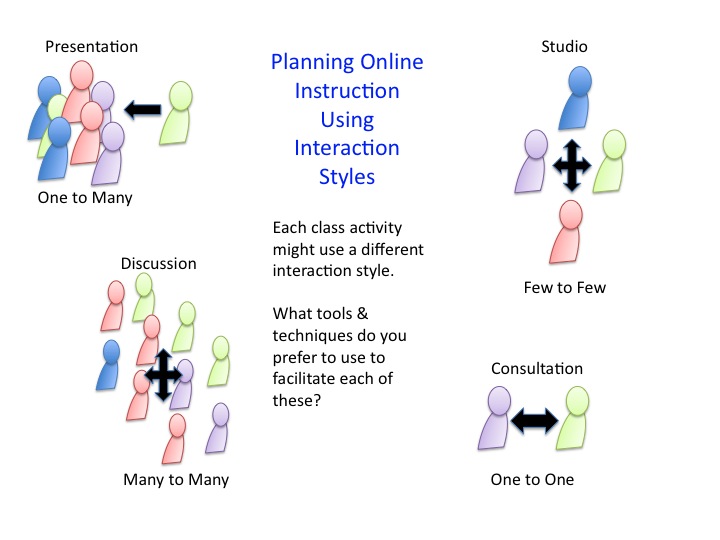
Learning requires interaction. Students interact with students, with course materials, with the teacher. When we plan courses in face-to-face environments, we often plan fairly complicated sets of interactions for a single class meeting. But when we teach in online or hybrid course formats, changing the interaction may mean changing tools, spaces, or times when certain activities may take place.

It all requires a bit more advanced planning too.

The diagram below shows different types of interaction styles that might be in play in a given class session or activity regardless of the learning environment. These can be used to plan sessions or to cue students about what to expect for a given session. When students are coming (at least partially) from corporate settings for instance - where each corporation has specific technology platforms that they use within the workforce, they might select different tools to manage each of these interaction styles. The teacher can specify some, but leave others up to students. The classroom’s demands can change with the session/semester.

graphic created in Powerpoint using drawing shapes (circle + half-circle for people; block arrows)
These symbols/labels (or better ones!) can even be used in a course schedule or syllabus to cue students about the types of interaction planned for each activity.


What are your favorite tools for facilitating?
PresentationDiscussion (lg group)Studio (sm group)Consultation
Powerpoint w/ audio & animation (anyone using prezi?) Second Life? brightmoo
there must be some free alternatives to second life by now?
Conference call w/ Skype (& Doodle poll to coordinate times)Skype
YouTube + ClipnabberCampfire - rooms, hosted, + nice archivingPBwiki for group authoringInstant Messaging
Google Chat
Camtasia - Jing both by TechSmith or Camstudio (free)

Microsoft
Expression Encoder (Windows only)
Discussion forums in your local LMSDropbox for file sharing...nice because it has 1) public URLs 2) synching across devices (e.g. home & lab/school machines)
Audacity for Podcasting

podbean.com (free podcasting hosting)

HD-Ogg for podcasting
http://www.fridgesoft.de/harddiskogg.php
(record in one click)
Simple real-time co-writing: http://etherpad.org/
http://typewith.me/
Semi-Auto Feedback

TextExpander
http://smilesoftware.com/TextExpander/

Texter
http://lifehacker.com/238306/lifehacker-code-texter-windows

SemiAuto Grader
http://sio.midco.net/jblessinger/index.htm

Autohotkey (very versatile): http://www.autohotkey.com/